 Get a Quote
![[:en]Control Circle Company[:ar]شركة دائرة التحكم[:]](https://ccco.com.sa/wp-content/themes/Control/assets/images/lang.svg "[:en]Control Circle Company[:ar]شركة دائرة التحكم[:]")
Access Control Systems: How to Improve Security in Commercial Facilities
Access Control Systems: How to Improve Security in Commercial Facilities

Every commercial facility has doors that should not be open to everyone: server rooms, cash offices, stores, records rooms, and staff-only areas. Traditional keys cannot tell you who entered, when they entered, or whether a lost key is now in the wrong hands. An access control system solves this by deciding electronically who can pass through each door, at what time, and by recording every attempt. For businesses in Saudi Arabia, from office towers in Riyadh to warehouses in Jeddah and malls across the Kingdom, an access control system has become a core part of modern security.
This guide explains how an access control system works, its main components and credential types, how it improves security in commercial facilities, and what to plan before choosing one.
What Is an Access Control System?
An access control system is an electronic security solution that manages who can enter specific areas of a building. Instead of physical keys, users present a credential, such as a card, a PIN code, a mobile phone, or a fingerprint. The access control system checks that credential against a set of rules and either unlocks the door or denies entry.
The real value lies in control and visibility. Managers can grant or remove access instantly, limit entry to certain hours, and review a complete record of who accessed each door. This is something mechanical locks and keys simply cannot provide.
How an Access Control System Works
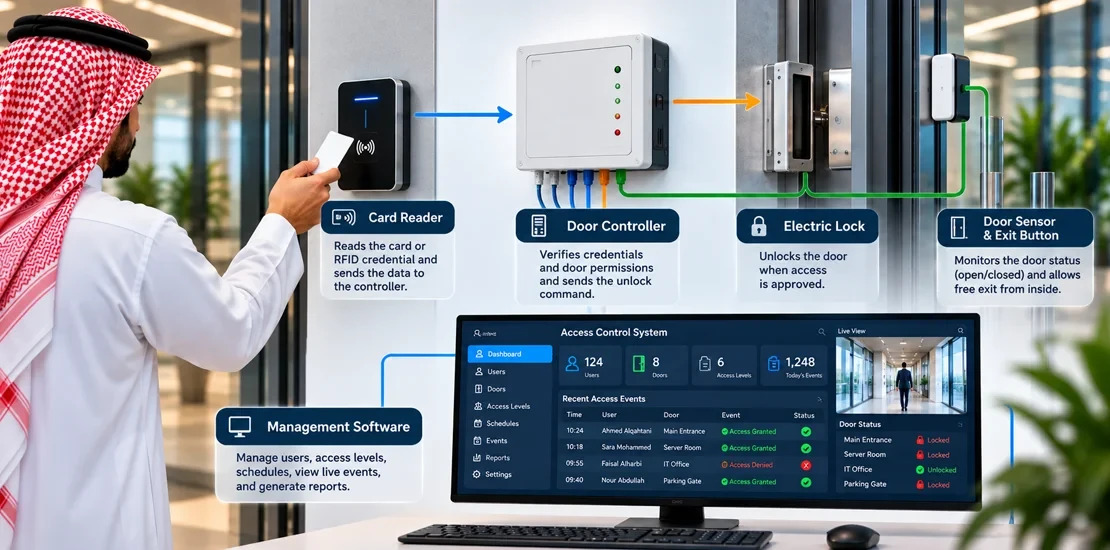
Although products differ, every access control system follows the same basic sequence each time someone approaches a controlled door:
- The user presents a credential to a reader installed next to the door.
- The reader sends the credential data to a door controller, which compares it with the permissions stored for that user, door, and time.
- If the rules allow entry, the controller releases the electric lock. If not, the door stays locked and the attempt is logged as denied.
- A door position sensor confirms whether the door actually opened and closed, and raises an alarm if it is forced or held open too long.
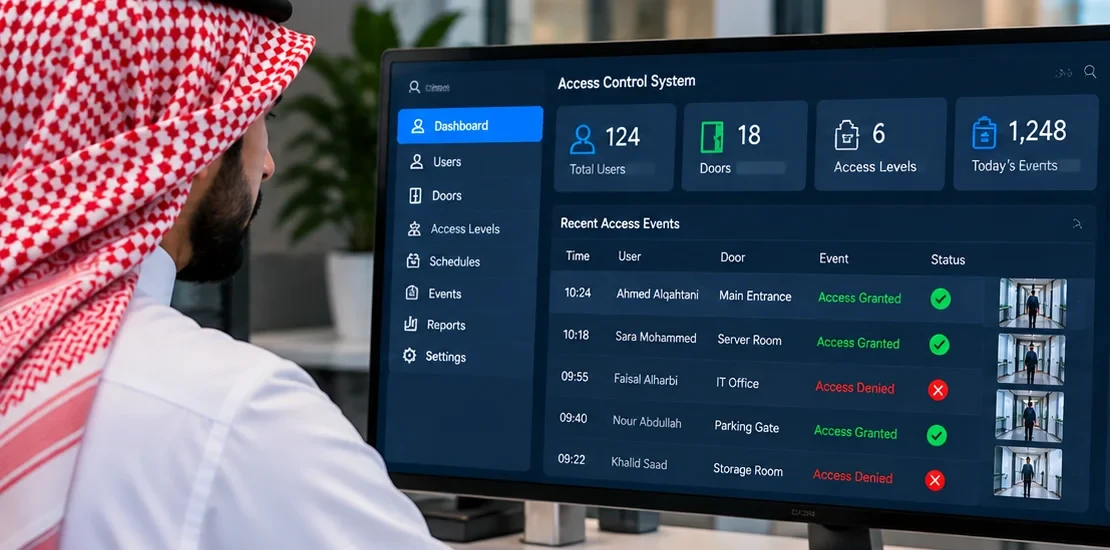
- Every event is stored in the access control system software, creating an audit trail that can be searched and reported on later.
This entire process takes less than a second, which is why a well-designed access control system improves security without slowing down daily movement.
Main Components of an Access Control System
- Devices that read cards, fobs, PIN codes, mobile credentials, or biometric data at the door.
- Door controllers. The decision-making units that store rules and control the locks. In networked systems, they also communicate with the central server.
- Electric locks. Magnetic locks, electric strikes, or motorized locks that open when the controller allows entry.
- Door position sensors and exit buttons. Sensors report the actual door status, while request-to-exit buttons or sensors allow people to leave freely.
- Management software. The platform where administrators add users, set permissions and schedules, and review events and reports.
- Power supplies and backup batteries. They keep controllers and locks working safely during power interruptions.
Each component must be selected to match the door type, traffic level, and risk of the area it protects. A reader suitable for a staff entrance may not be suitable for an outdoor gate or a high-security server room.
Types of Credentials: Which One Fits Your Facility?
The credential is what users interact with every day, so choosing the right type affects both security and user experience. The most common options in an access control system are:
| Credential | Security Level | Best Use |
| Proximity cards and fobs | Basic to medium (depends on card technology) | General staff entrances and internal doors |
| Encrypted smart cards | Medium to high | Offices, hospitals, and multi-tenant buildings |
| PIN codes | Low when used alone | Secondary factor or low-risk areas |
| Mobile credentials | Medium to high | Modern offices and flexible workspaces |
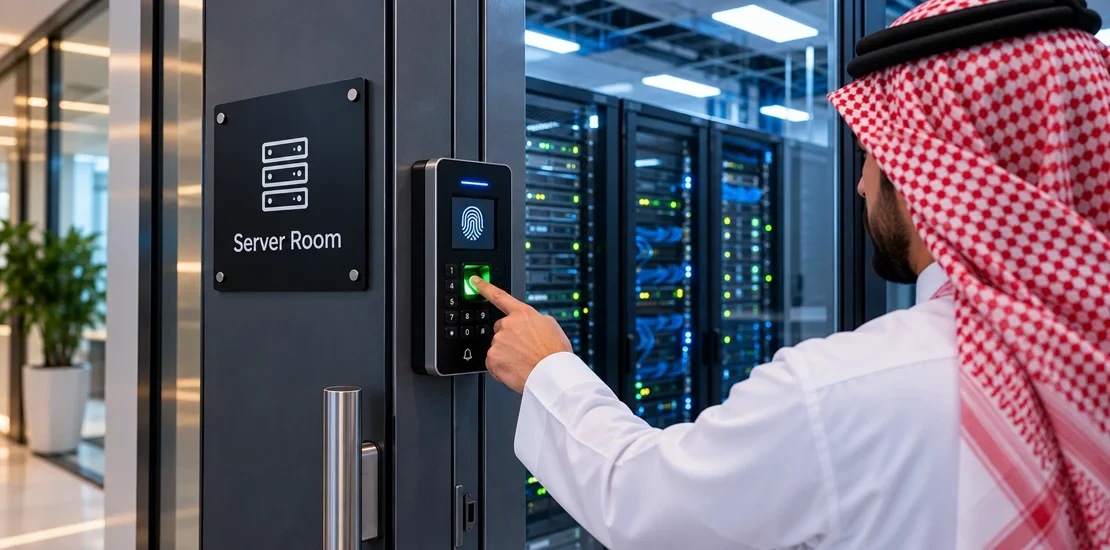
| Fingerprint readers | High | Restricted rooms and time attendance |
| Facial recognition | High, touchless | High-traffic entrances and hygiene-sensitive areas |
| Multi-factor (card + PIN or biometric) | Very high | Server rooms, cash offices, and critical areas |
Older low-frequency proximity cards can be copied relatively easily, so for sensitive areas it is better to use encrypted smart cards, mobile credentials, or biometrics, often combined as multi-factor authentication.
User experience matters as much as security. If a credential is slow or inconvenient, staff will look for shortcuts such as propping doors open or sharing cards. The best choice balances protection with ease of use at each entrance, for example touchless facial recognition at a busy main lobby and card plus PIN at a finance office. Planning credentials by area, rather than choosing one type for the whole building, usually gives the best result.
Standalone, Networked, and Cloud-Based Systems
An access control system can be designed in different architectures depending on the size of the facility and how it will be managed:
| Type | How It Works | Suitable For |
| Standalone | Each door has its own reader and controller with no central management | A few doors in small offices or shops |
| Networked (on-premise) | Controllers connect to a central server on the facility network | Medium and large facilities that need central control and reporting |
| Cloud-based | Controllers connect to a secure cloud platform managed through a web or mobile interface | Multi-branch businesses that want remote management |
For most commercial facilities, a networked or cloud-based access control system is the better long-term choice, because it allows instant changes to permissions, central reporting, and easy expansion when new doors or branches are added.
How an Access Control System Improves Commercial Security
A properly designed access control system strengthens security in several practical ways:
- Security zones. Each user can be given access only to the areas their job requires, so a sales employee does not have access to the server room or the finance office.
- Time-based access. Permissions can follow working hours, preventing entry at night or on weekends unless specifically authorized.
- Instant revocation. When an employee leaves or a card is lost, access is cancelled immediately, without changing locks.
- Anti-passback. This feature prevents one card from being passed back to another person to enter the same area twice.
- Complete audit trail. Every entry and denied attempt is recorded, providing evidence for investigations, audits, and insurance claims.
- Visitor and contractor management. Temporary credentials with automatic expiry keep track of everyone who is not a permanent employee.
- Lockdown capability. In an emergency, security staff can lock or unlock groups of doors from a single command.
For perimeter and after-hours protection, the access control system works best alongside an intrusion alarm system, which detects unauthorized movement in areas where no door event takes place.
Choosing the Right Access Control System by Facility Type
Different commercial facilities have different priorities, so the right access control system depends on how the building is used:
- Office buildings. Smart cards or mobile credentials with role-based permissions, plus visitor management at reception.
- Shopping malls. Control of service corridors, stores, management offices, and loading docks, with schedules that match opening hours.
- Hospitals and clinics. Strict control of pharmacies, operating theatres, and records rooms, often with biometric or multi-factor readers.
- Warehouses and factories. Rugged readers for outdoor gates and loading areas, with contractor access that expires automatically.
- Hotels and residential compounds. Management of guest or resident access, amenities, and staff areas from one platform.
- Data centers and server rooms. Multi-factor authentication, anti-passback, and detailed logging for every entry.
Integrating the Access Control System with CCTV and Fire Alarm
An access control system becomes far more effective when it works together with other security systems. When linked to a CCTV system, every door event can be matched with video, so operators see who actually used a card and can react immediately to forced or held-open doors.
The access control system must also be connected to the fire alarm system. When a fire alarm is activated, locks on escape routes must release automatically so occupants can evacuate safely. This interface must follow Saudi Civil Defense requirements and be tested before handover. For facilities that want one control room for all these functions, see our guide on integrated security systems.
Fail-Safe vs Fail-Secure Locks
One of the most important technical decisions in any access control system is how each lock behaves when power is lost:
- Fail-safe locks unlock when power is cut. They are typically required on doors that form part of escape routes, so people are never trapped.
- Fail-secure locks stay locked when power is cut, while still allowing free exit from the inside using a mechanical handle. They suit stores and high-value rooms that are not escape routes.
Choosing the wrong lock type can create a safety risk or a security gap, which is why lock selection should be part of the design review and checked against fire and life safety requirements.
Planning an Access Control System Project
A successful access control system starts with planning, not with buying readers. The key steps are:
- Assess the risks. A security risk assessment identifies which areas need protection and the level of control each one requires.
- Survey every door. Check door types, frames, and existing hardware to select suitable locks and readers.
- Define users and roles. Group users by department and function to build clear access levels and schedules.
- Plan infrastructure. Include cabling, network connections, power supplies, and backup batteries in the design from the start.
- Plan for growth. Choose an access control system that can add doors, sites, and integrations without replacement.
- Respect data privacy. Biometric and personal data must be handled in line with the Saudi Personal Data Protection Law (PDPL) and the organization’s own policies.
Specialized security consultation at this stage helps match the access control system to the facility’s real risks and avoids paying for features that will never be used, or missing ones that are essential.
Factors That Affect the Cost of an Access Control System
The cost of an access control system varies widely from one project to another. The main factors include:
- The number of controlled doors and the type of locks each door needs.
- The credential technology chosen, such as cards, mobile credentials, or biometrics.
- The system architecture: standalone, networked, or cloud-based, including any software licenses or subscriptions.
- Integration with CCTV, fire alarm, elevators, or other building systems.
- Cabling and installation complexity, especially in existing buildings with finished ceilings and walls.
The best approach is to request a detailed quotation based on a door-by-door survey, rather than comparing prices per reader alone.
Maintenance and Management Best Practices
An access control system needs ongoing care to stay reliable. Locks, door closers, and sensors wear out with daily use, and batteries lose capacity over time. Regular maintenance should include testing locks and door position sensors, checking backup batteries, updating firmware, and verifying the fire alarm release on escape doors.
Management matters just as much. User lists should be reviewed regularly to remove former employees and expired visitors, and access reports should be checked for unusual patterns, such as repeated denied attempts or entries outside normal hours.
Common Mistakes to Avoid
- Using easily copied cards in sensitive areas. Low-security cards are cheap, but they weaken the whole access control system.
- Ignoring door hardware. A strong reader on a weak door or a misaligned lock provides little real protection.
- Giving everyone full access. Broad permissions remove the main benefit of the system and make investigations harder.
- Skipping the fire alarm interface. Escape doors that do not release during a fire are a serious safety risk and will fail inspection.
- Choosing a closed system with no growth path. Some systems cannot add sites or integrations later, forcing a costly replacement.
Conclusion
An access control system gives commercial facilities in Saudi Arabia what keys never could: control over who enters each area, flexibility to change permissions instantly, and a full record of every event. When it is planned around real risks, built with the right credentials and locks, and integrated with CCTV and the fire alarm, an access control system becomes one of the most effective investments in the facility’s security.
Planning an access control system for your facility? The CCCO team can assess your doors and risks, recommend the right credentials and architecture, and install and integrate a complete access control system that meets your security and safety requirements. Contact us to request a site assessment.
Frequently Asked Questions
What is an access control system?
It is an electronic system that decides who can enter specific areas using credentials such as cards, PIN codes, mobile phones, or biometrics, and records every access event.
Which is better for an access control system: cards or biometrics?
Cards are practical for general entrances, while biometrics provide higher security for restricted areas. Many facilities use cards for most doors and biometrics or multi-factor authentication for sensitive rooms.
Can an access control system work during a power outage?
Yes, if it is designed with backup batteries for controllers and locks. The lock type also determines whether a door stays locked or releases when power is lost.
Can an access control system be managed remotely?
Networked and cloud-based systems can be managed remotely through secure web or mobile interfaces, which is useful for businesses with several branches.
Does an access control system need to connect to the fire alarm?
Yes. Escape route doors must release automatically when the fire alarm is activated, in line with Civil Defense requirements.
Can we add an access control system to an existing building?
Yes. A door survey determines the right locks and readers for existing doors, and wireless or low-cabling options can reduce disruption in finished buildings.
How long does it take to install an access control system?
It depends on the number of doors, the system type, and integration requirements. Small projects can be completed quickly, while large facilities are usually implemented in phases.